CryptoDataPy
CryptoDataPy allows you to create high quality ready-for-analysis data sets from a variety of sources with only a few lines of code. The easy to use interface facilitates each step of the ETL (extract-transform-load) process, saving you from having to spend countless hours studying documentation, extracting data from different file formats and sources, as well as wrangling and cleaning the data.
In this notebook, we will walk through how to use CryptoDataPy to collect various types of data from multiple sources and get it ready for data analysis.
Quick Start:
Long/short strategies: perpetual futures prices for long/short algo trading strategy development, with sample history extended back using aggregate exchange spot prices.
Data cleaning: on-chain data cleaning in a few lines of code.
Stablecoin analysis: key indicators for the largest stablecoins.
Objects:
DataCatalogallows you to explore what data is available and understand it better.DataRequestprovides an intuitive interface which allows you to specify the parameter values for the data you want.GetDataretrieves either metadata or time series data from the data source for the parameters specified in the data request.CleanDataprovides tools for data cleaning: filtering and repairing outliers, filtering assets trading below an average traded value (liquidity), removing observations with long periods of missing values, removing tickers with short price histories (minimum number of observations), and removing tickers to be excluded from the analysis (e.g. stablecoins).
Long/Short Strategies
Let’s collect market and funding rate data for long/short algo trading strategy research.
import pandas as pd
from matplotlib import pyplot as plt
import warnings
warnings.filterwarnings("ignore")
---------------------------------------------------------------------------
ModuleNotFoundError                       Traceback (most recent call last)
Cell In[1], line 1
----> 1 import pandas as pd
      2 from matplotlib import pyplot as plt
      3 import warnings

ModuleNotFoundError: No module named 'pandas'
Step 1: Define Asset Universe
First, we need to import DataRequest and GetData which will allow us to create a tickers list for our asset universe.
from cryptodatapy.extract.datarequest import DataRequest
from cryptodatapy.extract.getdata import GetData
Let’s get a list of tickers for the universe of assets with perpetual futures contracts trading on binance, the most liquid cryptoasset exchange.
data_req = DataRequest(source='ccxt')
perp_tickers = GetData(data_req).get_meta(method='get_markets_info', exch='binanceusdm', as_list=True)
Which gives us an asset universe of 150 + cryptoassets.
len(perp_tickers)
191
Step 2: Get Perpetual Futures Data
Next, let’s create a data request for both market prices and funding rates for those perpetual futures tickers, using only the first 10 tickers for illustrative purposes.
Note: using the source_tickers parameter is recommended when the tickers are already in the data source’s format. If data source’s format is not known, CryptoDataPy will convert tickers to source tickers automatically.
data_req = DataRequest(source='ccxt',
                       source_tickers=perp_tickers[:10],
                       fields=['close', 'volume', 'funding_rate'],
                       mkt_type='perpetual_future',
                       freq='d')
We can now retrieve this data request using the GetData object and the get_series method.
df = GetData(data_req).get_series()
df.head()
| close | volume | funding_rate | ||
|---|---|---|---|---|
| date | ticker | |||
| 2019-09-08 | BTC | 10391.63 | 3096.291 | <NA> |
| 2019-09-09 | BTC | 10307.0 | 14824.373 | <NA> |
| 2019-09-10 | BTC | 10102.02 | 9068.955 | <NA> |
| 2019-09-11 | BTC | 10159.55 | 10897.922 | 0.0003 |
| 2019-09-12 | BTC | 10415.13 | 15609.634 | 0.0003 |
Step 3: Extend Sample Size with Spot Data
Since perpetual futures only started trading in 2019 on Binance, this gives us a limited sample size for quantitative research. Let’s extend it back using spot prices from another data source.
We will need to replace the market tickers with base asset tickers first from aggregate exchange prices on CryptoCompare before pulling the data.
cc_tickers = [ticker.split('/')[0] for ticker in perp_tickers]
data_req = DataRequest(source='cryptocompare',
                       tickers=cc_tickers[:10],
                       fields=['close', 'volume'],
                       mkt_type='spot',
                       freq='d')
df1 = GetData(data_req).get_series()
We can now combine the two datasets to extend our history back to 2010.
df = df.unstack().combine_first(df1.unstack()).stack()
df.head()
| close | funding_rate | volume | ||
|---|---|---|---|---|
| date | ticker | |||
| 2010-07-17 | BTC | 0.04951 | <NA> | 20.0 |
| 2010-07-18 | BTC | 0.08584 | <NA> | 75.01 |
| 2010-07-19 | BTC | 0.0808 | <NA> | 574.0 |
| 2010-07-20 | BTC | 0.07474 | <NA> | 262.0 |
| 2010-07-21 | BTC | 0.07921 | <NA> | 575.0 |
Step 4: Filter Asset Universe
Lastly, we may want to filter this asset universe by:
identifying and repairing outliers
removing low trading volume cryptoassets (< $10 mil USD average traded volume)
removing cryptoassets with a limited data history (< 100 observations)
We will need to import CleanData to use the filter methods available.
# import CleanData
from cryptodatapy.transform.clean import CleanData
ERROR:prophet.plot:Importing plotly failed. Interactive plots will not work.
# Filter data
clean_df = CleanData(df).filter_outliers(od_method='mad').\
                         repair_outliers(imp_method='interpolate').\
                         filter_avg_trading_val(thresh_val=10000000).\
                         filter_missing_vals_gaps().\
                         filter_min_nobs().get(attr='df')
clean_df.dropna(how='all').head()
| close | funding_rate | volume | ||
|---|---|---|---|---|
| date | ticker | |||
| 2014-12-09 | BTC | 352.19 | <NA> | 43827.16 |
| 2014-12-10 | BTC | 347.94 | <NA> | 27133.46 |
| 2014-12-11 | BTC | 347.68 | <NA> | 51080.97 |
| 2014-12-12 | BTC | 353.4 | <NA> | 26850.92 |
| 2014-12-17 | BTC | 320.02 | <NA> | 61338.52 |
We have extended our data sample by an extra 5 years and are now ready to do some long/short algo trading strategy research!
Data Cleaning
Cryptoassets create a lot of data, but the data can have a lot of outliers and irregularities that can wreak havoc with predictive/ML models down stream. This is especially true for on-chain data and off-chain data, as well as higher frequency market data.
This makes data cleaning and important part of any high quality cryptoasset data pipeline.
Step 1: Data Extraction
Let’s start by collecting our data.
# glassnode
data_req = DataRequest(source='glassnode',
                       tickers=['btc', 'eth'],
                       fields=['close', 'add_act', 'hashrate'],
                       freq='d',
                      start_date='2016-01-01')
df = GetData(data_req).get_series()
With same data request parameters, can you retrieve the same data from other sources for comparison.
# coinmetrics
data_req = DataRequest(source='coinmetrics',
                       tickers=['btc', 'eth'],
                       fields=['close', 'add_act', 'hashrate'],
                       freq='d',
                      start_date='2016-01-01')
df1 = GetData(data_req).get_series()
# cryptocompare
data_req = DataRequest(source='cryptocompare',
                       tickers=['btc', 'eth'],
                       fields=['close', 'add_act', 'hashrate'],
                       freq='d',
                      start_date='2016-01-01')
df2 = GetData(data_req).get_series()
Step 2: Visual Data Inspection
Next, we can plot the series from various sources to compare them.
# concat dfs
df3 = pd.concat([df, df1, df2], axis=1)
add_act_df = df3.loc[pd.IndexSlice[:, 'ETH'], 'add_act'].droplevel(1)
# rename cols
col_names = [vendor + '_' + 'ETH_' + 'active_addresses' for vendor in ['glassnode', 'coinmetrics', 'cryptocompare']]
add_act_df.columns = col_names
# plot active addresses
add_act_df.plot(figsize=(15,5))
add_act_df.loc['2016-09-01':'2017-01-01'].plot(figsize=(15,5))
add_act_df.plot(subplots=True, layout=(1,3), figsize=(15,5))
plt.legend(loc='upper right');
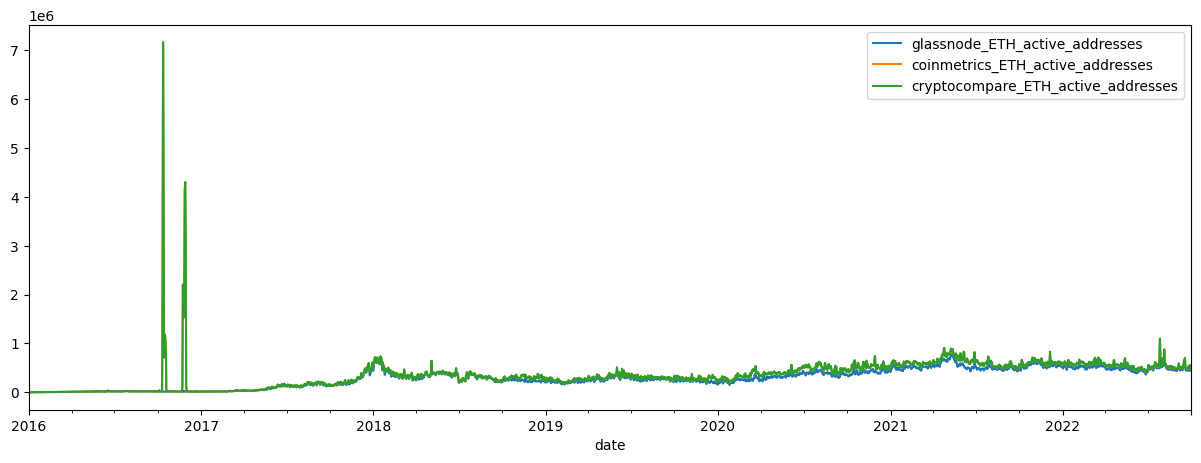
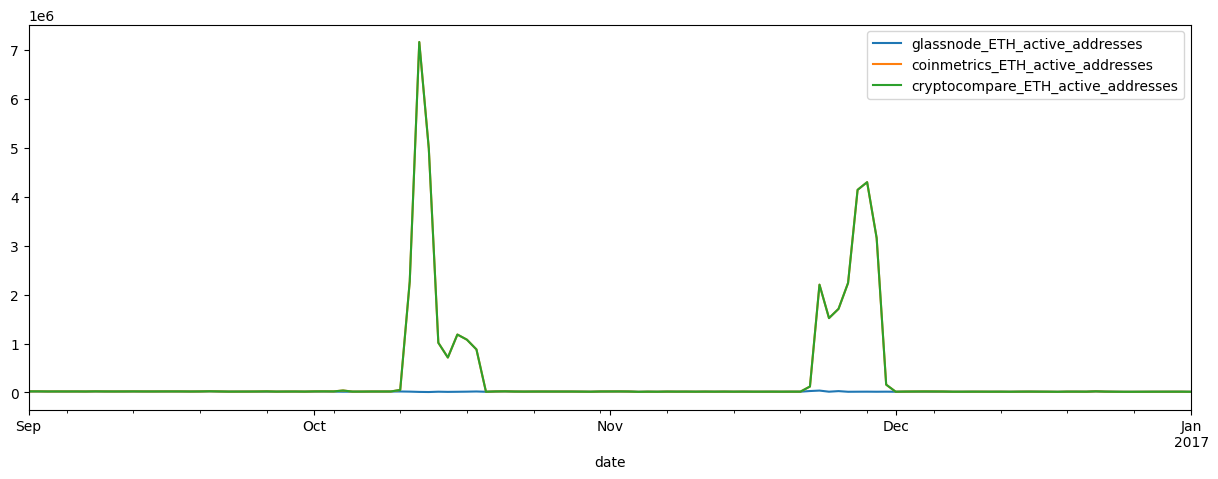
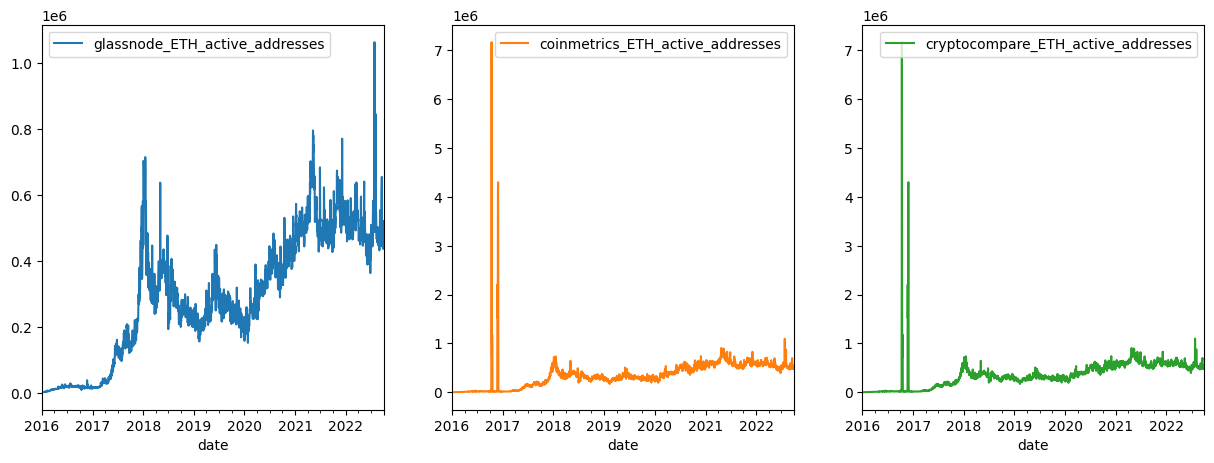
Comparing the three active address series, we notice that both the Cryptocompare and Coinmetrics active addresses appear to have large outliers in ETH active addresses in late 2016.
Large outliers can cause major distortions down stream in any machine learning or predictive process so cleaning this data before doing so is a necessary next step.
Step 3: Data Cleaning
Once outliers are detected through visual data inspection, they can be filtered and repaired by importing CryptoDataPy’s CleanData module.
We have several options:
Use the series without large outliers.
Filter the outliers using one of CryptoDataPy’s outlier detection methods (shown below) and keeping the ‘clean’ series.
Combine 1 and 2, e.g. filtering and repairing outliers using outlier detection and missing values imputation algorithms, and then taking the median (or some other measure of central tendency) from the resulting series as the representative ‘true series (also shown below).
# import CleanData
from cryptodatapy.transform.clean import CleanData
Here, we will use the STL outlier detection algorithm, similar to the one used by Twitter to filter/remove outliers, and then use the interpolation method for outlier repair.
# filter cryptocompare data
# show raw vs filtered plot
CleanData(df2).filter_outliers(od_method='stl').\
               repair_outliers(imp_method='interpolate').\
               show_plot(plot_series=('ETH', 'add_act'))
# save filtered df
clean_df2 = CleanData(df2).filter_outliers(od_method='stl').\
                           repair_outliers(imp_method='interpolate').\
                           get(attr='df')
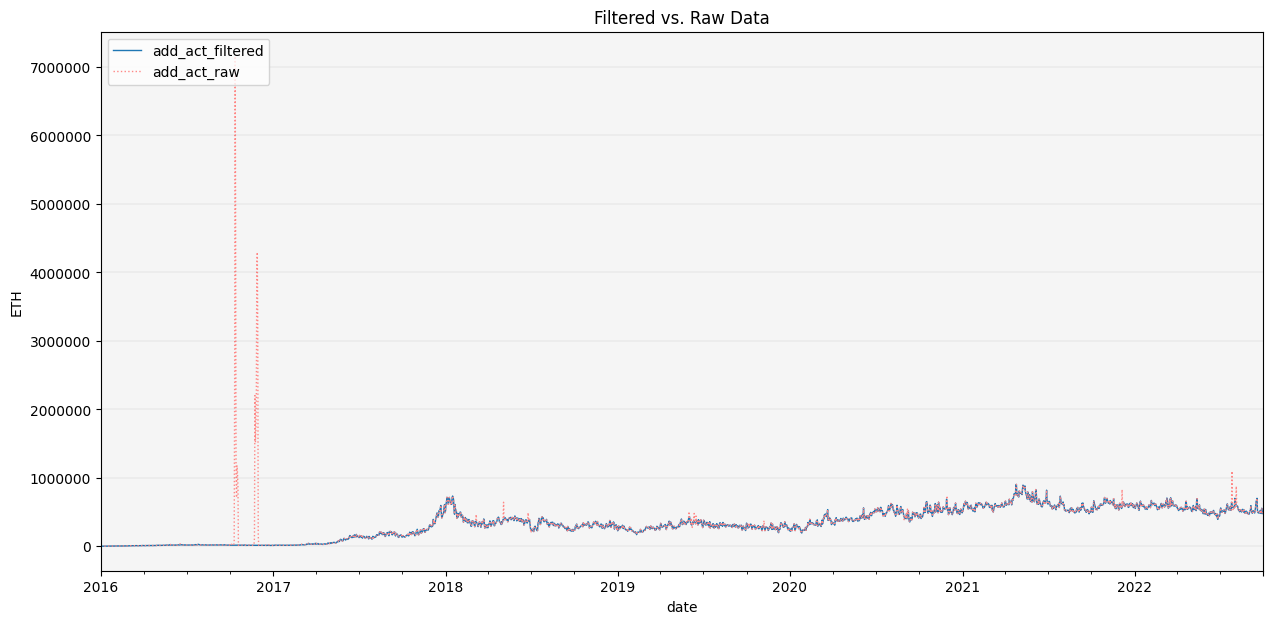
Let’s visually inspect the data once again to assess data quality.
# concat dfs
df_clean = pd.concat([df, clean_df1, clean_df2], axis=1)
add_act_df1 = df_clean.loc[pd.IndexSlice[:, 'ETH'], 'add_act'].droplevel(1)
# rename cols
col_names = [vendor + '_' + 'ETH_' + 'active_addresses' for vendor in ['glassnode', 'coinmetrics', 'cryptocompare']]
add_act_df1.columns = col_names
# plot active addresses
add_act_df1.plot(figsize=(15,5))
add_act_df1.loc['2016-09-01':'2017-01-01'].plot(figsize=(15,5))
add_act_df1.plot(subplots=True, layout=(1,3), figsize=(15,5))
plt.legend(loc='upper right');
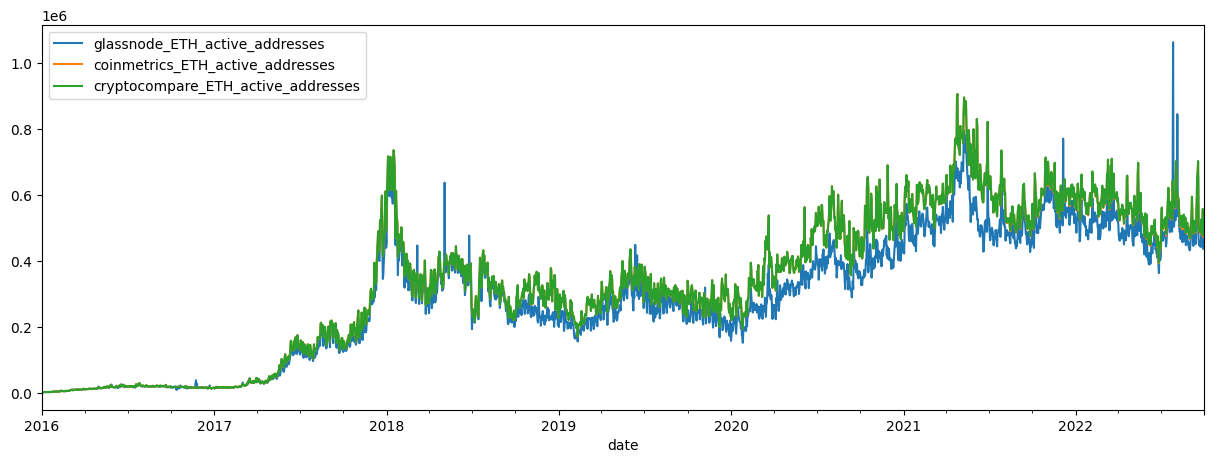
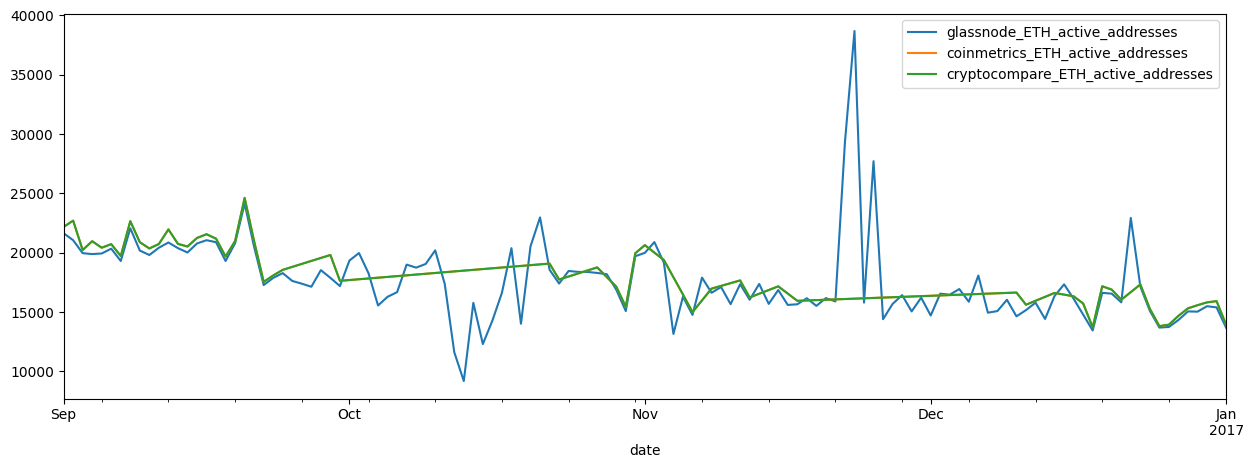
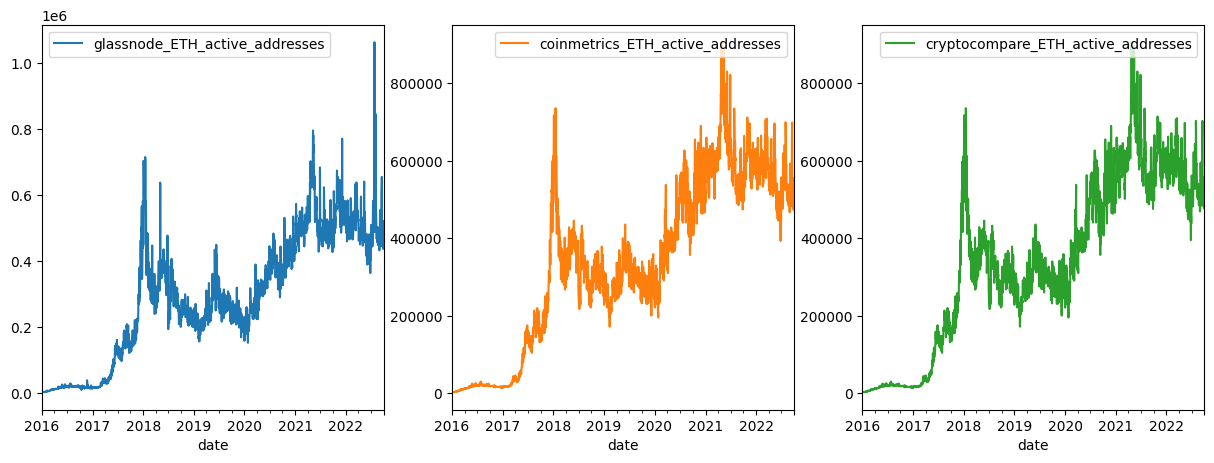
These data cleaning algorithms do a good job of filtering and repairing large outliers as we can see.
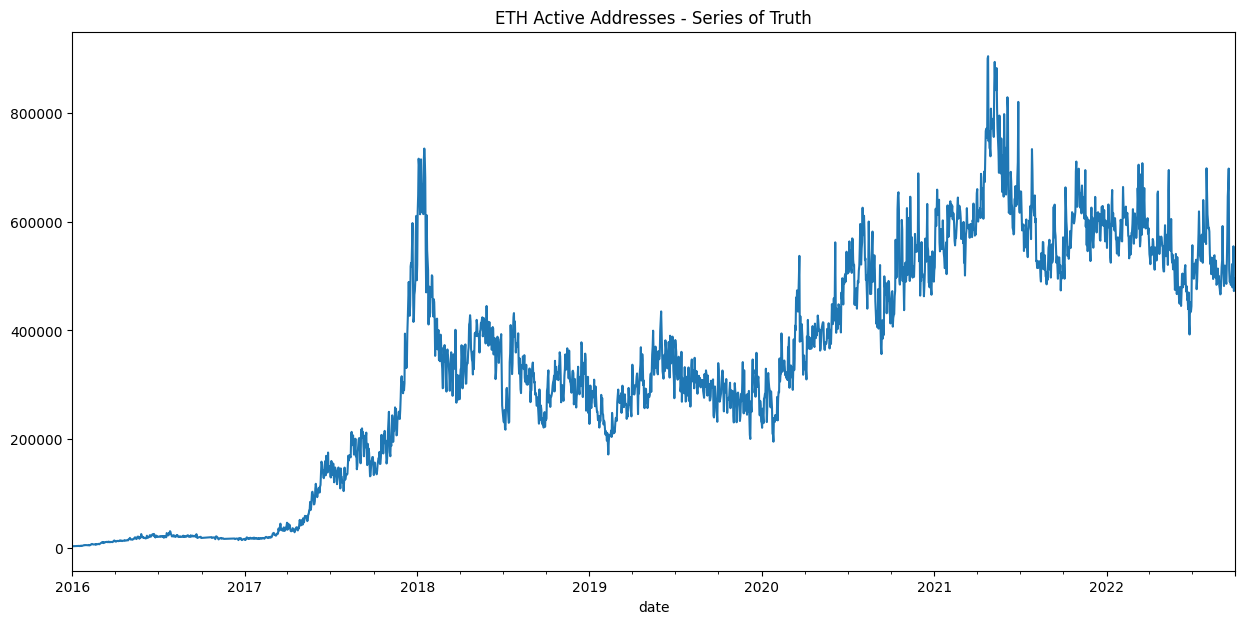
We can now use one of the ‘cleaned’ data sets for data analysis, or alternatively, use all 3 series to construct a ‘series of truth’ which uses the median of the 3 time series.
# plot series of truth
df_clean.add_act.median(axis=1).unstack()['ETH'].plot(title='ETH Active Addresses - Series of Truth', figsize=(15,7));
You are now ready to begin exploring, analyzing and predicting with clean data!
Stablecoin Analysis
Stablecoins are a growing and import part of the cryptoeconomic ecosystem. The recent failures of some stablecoin projects and the broader impact this can have on the ecosystem makes risk monitoring and analysis of stablecoins increasingly import.
CrptoDataPy makes it easy to find data on stablecoins.
The DataCatalog allows us to find information on the largest stablecoins by market cap.
from cryptodatapy.util.datacatalog import DataCatalog
dc = DataCatalog()
If we want to get metadata
sc_meta = dc.get_tickers_metadata(cat='crypto')
sc_meta.head()
| name | description | url | country_id_2 | country_id_3 | country_name | agg | category | subcategory | mkt_type | frequency | tenor | unit | quote_ccy | tiingo_id | fred_id | dbnomics_id | investpy_id | |
|---|---|---|---|---|---|---|---|---|---|---|---|---|---|---|---|---|---|---|
| ticker | ||||||||||||||||||
| USDT | Tether USDT | USDT is a cryptocurrency asset issued on the B... | NaN | WL | WLD | World | WL | crypto | stablecoin | spot | tick | NaN | fiat currency per unit of stablecoin | NaN | NaN | NaN | NaN | NaN |
| USDC | USD Coin | USD Coin (USDC) is a fully collateralized US ... | NaN | WL | WLD | World | WL | crypto | stablecoin | spot | tick | NaN | fiat currency per unit of stablecoin | NaN | NaN | NaN | NaN | NaN |
| BUSD | Binance USD | Binance USD (BUSD) is a stable coin pegged to ... | NaN | WL | WLD | World | WL | crypto | stablecoin | spot | tick | NaN | fiat currency per unit of stablecoin | NaN | NaN | NaN | NaN | NaN |
| DAI | Dai DAI | The Maker Protocol, also known as the Multi-Co... | NaN | WL | WLD | World | WL | crypto | stablecoin | spot | tick | NaN | fiat currency per unit of stablecoin | NaN | NaN | NaN | NaN | NaN |
| FRAX | Frax FRAX | Frax attempts to be the first stablecoin proto... | NaN | WL | WLD | World | WL | crypto | stablecoin | spot | tick | NaN | fiat currency per unit of stablecoin | NaN | NaN | NaN | NaN | NaN |
Or we can get a list of stablecoins
sc_list = dc.get_tickers_metadata(cat='crypto', as_list=True)
sc_list[:10]
['XAUT',
 'USDT',
 'EOSDT',
 'USDN',
 'USDX',
 'ALUSD',
 'YUSD',
 'RSV',
 'OUSD',
 'JGBP']
If instead we want an updated stablecoin list, we can use the scrape_stablecoins method to scrape stablecoin information for various source. The information will be returned to us sorted by market cap.
sc_scraped = dc.scrape_stablecoins(source='coinmarketcap')
sc_scraped.head()
| name | price | 24h_%_chg | 7d_%_chg | mkt_cap | volume_24h | circ_suppkly | |
|---|---|---|---|---|---|---|---|
| ticker | |||||||
| USDT | Tether | 1.0000 | 0.0000 | 0.0001 | 6.796102e+10 | 3.447678e+21 | 6.795470e+10 |
| USDC | USD Coin | 1.0000 | 0.0001 | 0.0001 | 4.959400e+10 | 3.761719e+19 | 4.959359e+10 |
| BUSD | Binance USD | 0.9996 | 0.0007 | 0.0003 | 2.050853e+10 | 6.563867e+19 | 2.051725e+10 |
| DAI | Dai | 0.9995 | 0.0005 | 0.0001 | 6.926312e+09 | 1.957382e+17 | 6.930064e+09 |
| FRAX | Frax | 0.9928 | 0.0041 | 0.0055 | 1.346251e+09 | 1.413502e+13 | 1.355966e+09 |
top_sc_list = sc_scraped.index.to_list()[:5]
We can take the top 5 stablecoins by market cap and we can find out which ones have available data selecting from a specific source.
cm_assets = GetData(DataRequest(source='coinmetrics')).get_meta(attr='assets')
cm_sc_list = [asset for asset in cm_assets if asset.upper() in top_sc_list]
Coinmetrics provides data on all of them
len(cm_sc_list)
5
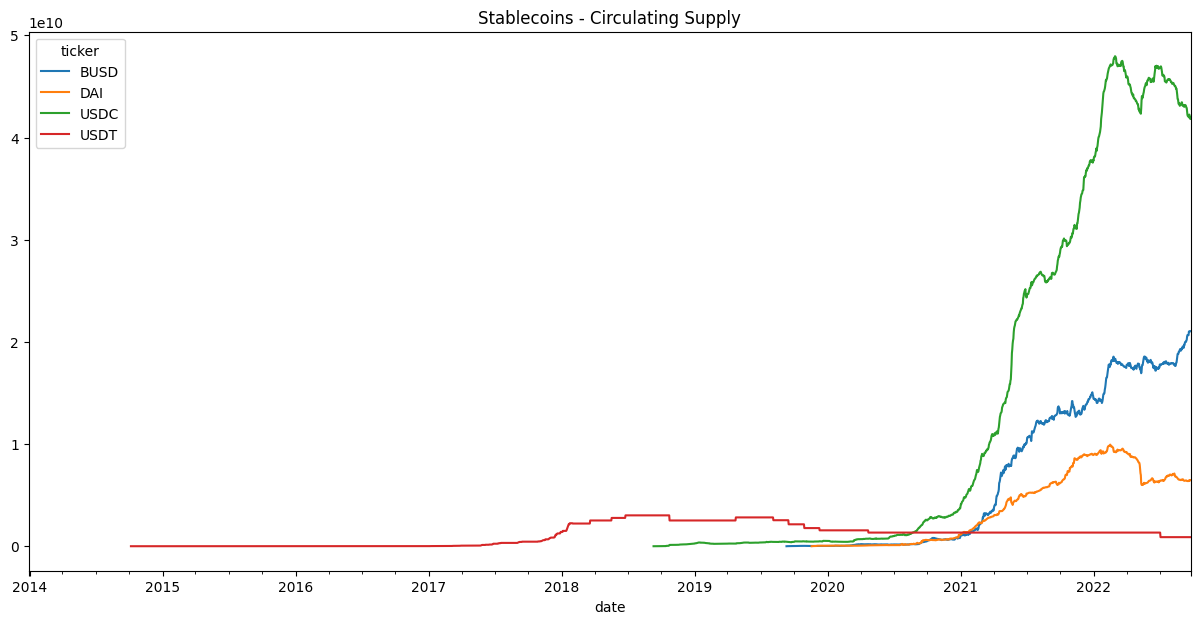
We can then narrow it down further to the assets with circulating supply data, a key metric for stablecoin health.
data_req = DataRequest(source='coinmetrics', tickers=cm_sc_list, fields=['supply_circ', 'ref_rate_usd'])
cm_supply_list = GetData(data_req).get_meta(method='get_onchain_tickers_list', data_req=data_req)
cm_sc_list = [asset for asset in cm_supply_list if asset.upper() in top_sc_list]
cm_sc_list
['usdc', 'busd', 'usdt', 'dai']
Finally, we can pull circulationg supply for those stablecoins
data_req = DataRequest(source='coinmetrics', tickers=cm_sc_list, fields=['supply_circ', 'ref_rate_usd'])
df = GetData(data_req).get_series()
df.head()
| supply_circ | ref_rate_usd | ||
|---|---|---|---|
| date | ticker | ||
| 2013-12-29 | USDT | <NA> | 0.997938 |
| 2013-12-30 | USDT | <NA> | 1.004237 |
| 2013-12-31 | USDT | <NA> | 0.996674 |
| 2014-01-01 | USDT | <NA> | 0.990799 |
| 2014-01-02 | USDT | <NA> | 0.995514 |
df.unstack().supply_circ.plot(title='Stablecoins - Circulating Supply', figsize=(15,7));
df.unstack().ref_rate_usd.plot(title='Stablecoins - Price', figsize=(15,7));
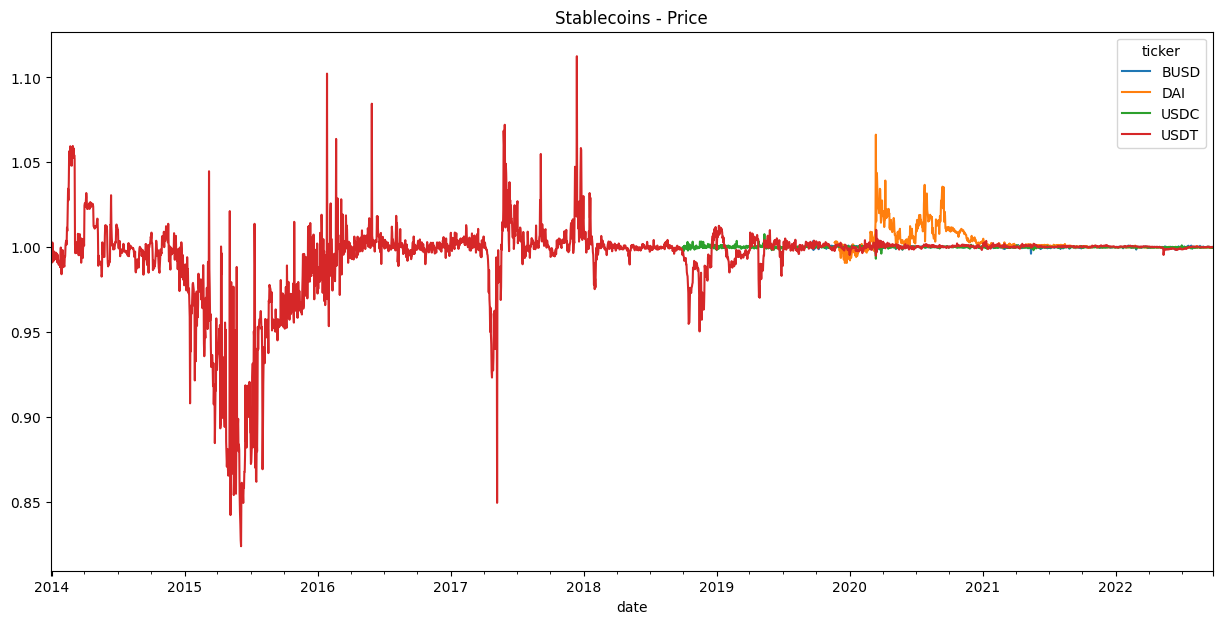
You are now ready to monitor key indicators for stablecoins!
For a deeper dive on how to maximize your use of CryptoDataPy, we explore how to use each one of it’s objects below.
Data Catalog
The DataCatalog allow us to explore what data is available and understand it better.
It includes the following attributes and methods:
data_sourcesattribute retrieves information on all the available data sources.get_tickers_metadatamethod retrieves information on available tickers. Theget_fields_metadatamethod retrieves information on available fields.search_tickersmethod allows you to search for tickers by ticker, country, country id, asset class, etc. Thesearch_fieldsmethod allows you to search for fields by name, id, category, etc. It also provides identifiers for each data source.scrape_stablecoinsmethod scrapes information on stablecoins from the selected source.
To access the data catalog, instantiate a DataCatalog object.
from cryptodatapy.util.datacatalog import DataCatalog
dc = DataCatalog()
Data Sources
Available data sources
dc.data_sources
{'ccxt': 'https://github.com/ccxt/ccxt',
 'cryptocompare': 'https://min-api.cryptocompare.com/documentation',
 'coinmetrics': 'https://docs.coinmetrics.io/info/markets',
 'glassnode': 'https://glassnode.com/',
 'tiingo': 'https://api.tiingo.com/products/crypto-api',
 'yahoo finance': 'https://finance.yahoo.com/',
 'investpy': 'https://investpy.readthedocs.io/',
 'dbnomics': 'https://db.nomics.world/providers',
 'fred': 'https://fred.stlouisfed.org/'}
Metadata
Available tickers can be accessed with the get_tickers_metadata method.
Note: cryptoasset and individual equity tickers are not listed in the tickers metadata due to a large number of assets. They can be accessed by calling the data source object and using the get_assets_info method to see available tickers.
dc.get_tickers_metadata().head()
| name | description | url | country_id_2 | country_id_3 | country_name | agg | category | subcategory | mkt_type | frequency | tenor | unit | quote_ccy | tiingo_id | fred_id | dbnomics_id | investpy_id | |
|---|---|---|---|---|---|---|---|---|---|---|---|---|---|---|---|---|---|---|
| ticker | ||||||||||||||||||
| ARS | Argentine Peso | Argentine Peso vs. quote currency, spot exchan... | NaN | AR | ARG | Argentina | EM | fx | spot rate | spot | tick | NaN | foreign currency per unit of domestic currrency | NaN | ARS | NaN | NaN | NaN |
| AUD | Australian Dollar | Australian Dollar vs. quote currency, spot exc... | NaN | AU | AUS | Australia | DM | fx | spot rate | spot | tick | NaN | foreign currency per unit of domestic currrency | NaN | AUD | NaN | NaN | NaN |
| EUR | Euro | Euro vs. quote currency, spot exchange rate | NaN | AT | AUT | Austria | DM | fx | spot rate | spot | tick | NaN | foreign currency per unit of domestic currrency | NaN | EUR | NaN | NaN | NaN |
| EUR | Euro | Euro vs. quote currency, spot exchange rate | NaN | BE | BEL | Belgium | DM | fx | spot rate | spot | tick | NaN | foreign currency per unit of domestic currrency | NaN | EUR | NaN | NaN | NaN |
| BDT | Bangladeshi Taka | Bangladeshi Taka vs. quote currency, spot exch... | NaN | BD | BGD | Bangladesh | NaN | fx | spot rate | spot | tick | NaN | foreign currency per unit of domestic currrency | NaN | BDT | NaN | NaN | NaN |
Available fields can be accessed with the get_fields_metadata method.
dc.get_fields_metadata().head()
| name | description | category | subcategory | freq | unit | data_type | cryptocompare_id | coinmetrics_id | ccxt_id | glassnode_id | tiingo_id | investpy_id | dbnomics_id | fred_id | av-daily_id | av-forex-daily_id | yahoo_id | |
|---|---|---|---|---|---|---|---|---|---|---|---|---|---|---|---|---|---|---|
| id | ||||||||||||||||||
| date | date | date and time | all | none | all | YYYY-MM-DD-HH:MM:SS | DatetimeIndex | time | time | datetime | t | date | Date | period | DATE | index | index | Date |
| ticker | ticker symbol | ticker symbol for asset or index | all | none | all | none | string | symbol | market | symbol | NaN | ticker | NaN | NaN | symbol | ticker | ticker | Symbols |
| bid | best bid price | highest price that a buyer is willing to pay f... | market | quotes | tick | quote currency units | Float64 | NaN | bid_price | NaN | NaN | NaN | NaN | NaN | NaN | NaN | NaN | NaN |
| ask | best ask price | lowest price that a seller is willing to sell ... | market | quotes | tick | quote currency units | Float64 | NaN | ask_price | NaN | NaN | NaN | NaN | NaN | NaN | NaN | NaN | NaN |
| bid_size | bid size | The quantity/size of the highest price bid | market | quotes | tick | asset units | Float64 | NaN | bid_size | NaN | NaN | NaN | NaN | NaN | NaN | NaN | NaN | NaN |
Search
We can search for tickers with the search_tickers method by column name and keyword.
Let’s look for tickers with assets in the US.
dc.search_tickers(by_col='country_id_2', keyword='US').head()
| name | description | url | country_id_2 | country_id_3 | country_name | agg | category | subcategory | mkt_type | frequency | tenor | unit | quote_ccy | tiingo_id | fred_id | dbnomics_id | investpy_id | |
|---|---|---|---|---|---|---|---|---|---|---|---|---|---|---|---|---|---|---|
| ticker | ||||||||||||||||||
| USD | Us Dollar | Us Dollar vs. quote currency, spot exchange rate | NaN | US | USA | United States | DM | fx | spot rate | spot | tick | NaN | foreign currency per unit of domestic currrency | NaN | USD | NaN | NaN | NaN |
| USD_TWI | US Dollar Trade-Weighted Index, Nominal Broad | The trade-weighted US dollar index, also known... | https://fred.stlouisfed.org/series/DTWEXBGS | US | USA | United States | DM | fx | index | spot | d | NaN | trade-weighted index | USD | NaN | DTWEXBGS | NaN | NaN |
| USD_Idx | US Dollar Index Spot | The Ice U.S. Dollar Index (USDX, DXY, DX, or i... | https://www.theice.com/forex/usdx | US | USA | United States | DM | fx | index | spot | tick | NaN | weighted-index | USD | NaN | NaN | NaN | US Dollar Index |
| USD_Idx_Fut | US Dollar Index Futures, USDX | The Ice U.S. Dollar Index (USDX, DXY, DX, or i... | https://www.theice.com/products/194/US-Dollar-... | US | USA | United States | DM | fx | index | future | tick | NaN | weighted-index | USD | NaN | NaN | NaN | US Dollar Index Futures |
| USD_Idx_ETF | Invesco DB US Dollar Index Bullish Fund | The Invesco DB US Dollar Index Bullish (Fund) ... | https://www.invesco.com/us/financial-products/... | US | USA | United States | DM | fx | index | etf | tick | NaN | weighted-index | USD | UUP | NaN | NaN | NaN |
The same can be done when searching for fields.
For example, let’s look for avaialble on-chain data fields.
dc.search_fields(by_col='category', keyword='on-chain').head()
| name | description | category | subcategory | freq | unit | data_type | cryptocompare_id | coinmetrics_id | ccxt_id | glassnode_id | tiingo_id | investpy_id | dbnomics_id | fred_id | av-daily_id | av-forex-daily_id | yahoo_id | |
|---|---|---|---|---|---|---|---|---|---|---|---|---|---|---|---|---|---|---|
| id | ||||||||||||||||||
| add_act | active addresses | number of unique addresses that were active in... | on-chain | addresses | d, w, m, q | addresses | Int64 | active_addresses | AdrActCnt | NaN | addresses/active_count | NaN | NaN | NaN | NaN | NaN | NaN | NaN |
| add_act_new | new addresses | number of new unique addresses that were creat... | on-chain | addresses | d, w, m, q | addresses | Int64 | new_addresses | NaN | NaN | addresses/new_non_zero_count | NaN | NaN | NaN | NaN | NaN | NaN | NaN |
| add_act_sent | active addresses sent | number of unique addresses that were active in... | on-chain | addresses | d, w, m, q | addresses | Int64 | NaN | AdrActSentCnt | NaN | addresses/sending_count | NaN | NaN | NaN | NaN | NaN | NaN | NaN |
| add_act_rec | active addresses received | number of unique addresses that were active in... | on-chain | addresses | d, w, m, q | addresses | Int64 | NaN | AdrActRecCnt | NaN | addresses/receiving_count | NaN | NaN | NaN | NaN | NaN | NaN | NaN |
| add_tot | total address count | number of unique addresses in the network at ... | on-chain | addresses | d, w, m, q | addresses | Int64 | unique_addresses_all_time | NaN | NaN | addresses/count | NaN | NaN | NaN | NaN | NaN | NaN | NaN |
Stablecoins
We can find static info on stablecoins by using the get_tickers_metadata method and setting the cat parameter to ‘crypto’
dc.get_tickers_metadata(cat='crypto').head()
| name | description | url | country_id_2 | country_id_3 | country_name | agg | category | subcategory | mkt_type | frequency | tenor | unit | quote_ccy | tiingo_id | fred_id | dbnomics_id | investpy_id | |
|---|---|---|---|---|---|---|---|---|---|---|---|---|---|---|---|---|---|---|
| ticker | ||||||||||||||||||
| USDT | Tether USDT | USDT is a cryptocurrency asset issued on the B... | NaN | WL | WLD | World | WL | crypto | stablecoin | spot | tick | NaN | fiat currency per unit of stablecoin | NaN | NaN | NaN | NaN | NaN |
| USDC | USD Coin | USD Coin (USDC) is a fully collateralized US ... | NaN | WL | WLD | World | WL | crypto | stablecoin | spot | tick | NaN | fiat currency per unit of stablecoin | NaN | NaN | NaN | NaN | NaN |
| BUSD | Binance USD | Binance USD (BUSD) is a stable coin pegged to ... | NaN | WL | WLD | World | WL | crypto | stablecoin | spot | tick | NaN | fiat currency per unit of stablecoin | NaN | NaN | NaN | NaN | NaN |
| DAI | Dai DAI | The Maker Protocol, also known as the Multi-Co... | NaN | WL | WLD | World | WL | crypto | stablecoin | spot | tick | NaN | fiat currency per unit of stablecoin | NaN | NaN | NaN | NaN | NaN |
| FRAX | Frax FRAX | Frax attempts to be the first stablecoin proto... | NaN | WL | WLD | World | WL | crypto | stablecoin | spot | tick | NaN | fiat currency per unit of stablecoin | NaN | NaN | NaN | NaN | NaN |
For dynamic/real-time info on stablecoins, we can scrape the data from CoinGecko or CoinMarketCap using the scrape_stablecoins method.
dc.scrape_stablecoins(source='coinmarketcap').head()
| name | price | 24h_%_chg | 7d_%_chg | mkt_cap | volume_24h | circ_suppkly | |
|---|---|---|---|---|---|---|---|
| ticker | |||||||
| USDT | Tether | 1.0000 | 0.0000 | 0.0001 | 6.796102e+10 | 3.447678e+21 | 6.795470e+10 |
| USDC | USD Coin | 1.0000 | 0.0001 | 0.0001 | 4.959400e+10 | 3.761719e+19 | 4.959359e+10 |
| BUSD | Binance USD | 0.9996 | 0.0007 | 0.0003 | 2.050853e+10 | 6.563867e+19 | 2.051725e+10 |
| DAI | Dai | 0.9995 | 0.0005 | 0.0001 | 6.926312e+09 | 1.957382e+17 | 6.930064e+09 |
| FRAX | Frax | 0.9928 | 0.0041 | 0.0055 | 1.346251e+09 | 1.413502e+13 | 1.355966e+09 |
Data Request
DataRequest provides an intuitive parameter interface which allows you to specify the parameter values for the data you want.
By initializing a DataRequest object, we provide all the relevant parameters needed to retrieve data from the selected data source. DataRequest will automatically convert parameter values to the format required for each data source, allowing the user to experience a consistent and intuitive interface for every data source.
data_req = DataRequest(
    source='cryptocompare',  # provide the name of the supported data source, if not specified defaults to 'CCXT'
    tickers=['btc', 'eth'],  # ticker symbols, if not specified defaults to 'btc'
    freq = 'd',  # frequency of data, if not specified defaults to daily
    quote_ccy = 'USDT',  # quote currency, if not specified defaults to USD/USDT
    exch = None,  # exchance, if not specified defaults to aggregate
    mkt_type = "spot",  # market type, if not specified defaults to spot
    start_date = None,  # start date, if not specified defaults to beginning of data history
    end_date = None,  # end date, if not specified defaults to end of data history
    fields = ["close", 'volume', "add_act"],  # data fields, if not specified defaults to close
    tz = None,  # timezone, if not specified defaults to 'UTC'
    inst = None,  # institution name, only necessary when retrieving data from institution, e.g. grayscale
    cat = None,  # category of asset or data, must be specified when data source provides data for many asset classes
    trials = 3,  # number of tries when requesting data, defaults to 3
    pause = 0.1,  # pause between trials to avoid rate limits, defaults to 0.1 sec
    source_tickers = None,  # tickers in data source format, overrides tickers parameter when specified
    source_freq = None,  # frequency in data source format, overrides tickers parameter when specified
    source_fields = None,  # fields in data source format, overrides tickers parameter when specified
           )
print(vars(data_req))
{'_source': 'cryptocompare', '_tickers': ['btc', 'eth'], '_frequency': 'd', '_quote_ccy': 'USDT', '_exch': None, '_mkt_type': 'spot', '_start_date': None, '_end_date': None, '_fields': ['close', 'volume', 'add_act'], '_timezone': None, '_inst': None, '_category': None, '_trials': 3, '_pause': 0.1, '_source_tickers': None, '_source_freq': None, '_source_fields': None}
Get Data
GetData retrieves either metadata or time series data from the data source and parameters specified in the data request.
get_metamethod will instantiate a data source object for the selected data source and retrieve all the relevant metadata for it.get_seriesmethod will retrieve any time series data by initializing the selected data source’s object and using theget_datamethod. The data is retrieved and wrangled into tidy data format.
Get Meta
Using the DataRequest object we initialized in the previous section, we can get information on availalable assets by using the get_meta method and specifying the metadata method for the data source.
GetData(data_req).get_meta(method='get_assets_info').head()
| Id | Url | ImageUrl | ContentCreatedOn | Name | Symbol | CoinName | FullName | Description | AssetTokenStatus | ... | MaxSupply | MktCapPenalty | IsUsedInDefi | IsUsedInNft | PlatformType | AlgorithmType | Difficulty | BuiltOn | SmartContractAddress | DecimalPoints | |
|---|---|---|---|---|---|---|---|---|---|---|---|---|---|---|---|---|---|---|---|---|---|
| ticker | |||||||||||||||||||||
| 42 | 4321 | /coins/42/overview | /media/35650717/42.jpg | 1427211129 | 42 | 42 | 42 Coin | 42 Coin (42) | Everything about 42 coin is 42 - apart from th... | N/A | ... | 42 | 0 | 0 | 0 | blockchain | scrypt | 41.514489 | NaN | NaN | NaN |
| 300 | 749869 | /coins/300/overview | /media/27010595/300.png | 1517935016 | 300 | 300 | 300 token | 300 token (300) | 300 token is an ERC20 token. This Token was cr... | N/A | ... | 300 | 0 | 0 | 0 | token | NaN | NaN | ETH | 0xaec98a708810414878c3bcdf46aad31ded4a4557 | 18 |
| 365 | 33639 | /coins/365/overview | /media/352070/365.png | 1480032918 | 365 | 365 | 365Coin | 365Coin (365) | 365Coin is a Proof of Work and Proof of Stake ... | N/A | ... | -1 | 0 | 0 | 0 | blockchain | NaN | NaN | NaN | NaN | NaN |
| 404 | 21227 | /coins/404/overview | /media/35650851/404-300x300.jpg | 1466100361 | 404 | 404 | 404Coin | 404Coin (404) | 404 is a PoW/PoS hybrid cryptocurrency that al... | N/A | ... | -1 | 0 | 0 | 0 | blockchain | NaN | NaN | NaN | NaN | NaN |
| 433 | 926547 | /coins/433/overview | /media/34836095/433.png | 1541597321 | 433 | 433 | 433 Token | 433 Token (433) | 433 Token is a decentralised soccer platform t... | Finished | ... | NaN | NaN | NaN | NaN | NaN | NaN | NaN | NaN | NaN | NaN |
5 rows × 36 columns
Get Series
We can then pull the time series data using the get_series method.
df = GetData(data_req).get_series()
df.head()
| close | volume | add_act | ||
|---|---|---|---|---|
| date | ticker | |||
| 2009-01-03 | BTC | <NA> | <NA> | 1 |
| 2009-01-04 | BTC | <NA> | <NA> | <NA> |
| 2009-01-05 | BTC | <NA> | <NA> | <NA> |
| 2009-01-06 | BTC | <NA> | <NA> | <NA> |
| 2009-01-07 | BTC | <NA> | <NA> | <NA> |
Clean Data
CleanData provides tools for data cleaning.
OutlierDetectionclass contains a range of method for outlier detection in time series data. Many traditional outlter detection method are not well suited for time series data.Filterclass contains methods that allow the filtering of unwanted values (e.g. below a trading liquidity threshold) and tickers (ticker with insufficient price history or stablecoins) to get the data ready for a specific type of analysis (e.g. long/short startegy research, on-chain predictive analytics, etc).Imputeclass deals with missing values in the data with methods that will replace missing values, or repair outliers which were removed by an outlier detection algorithm.CleanDataclass is composed of the previous three classes to allow the creation of a data cleaningn pipeline in a few lines of code.
Outlier Detection
The OutlierDetection class has 8 methods which implement an outlier detection algorithm with the flexibility to set parameters according to use case.
For example, we can use the stl outlier detection method to decompose series into three components: trend, seasonal and residual.
We run it on the dataframe we retrieved in the previous section using the filter_outliers method and show_plot to show the results.
CleanData(df).filter_outliers(od_method='stl', thresh_val=20).show_plot(plot_series=('ETH', 'add_act'))
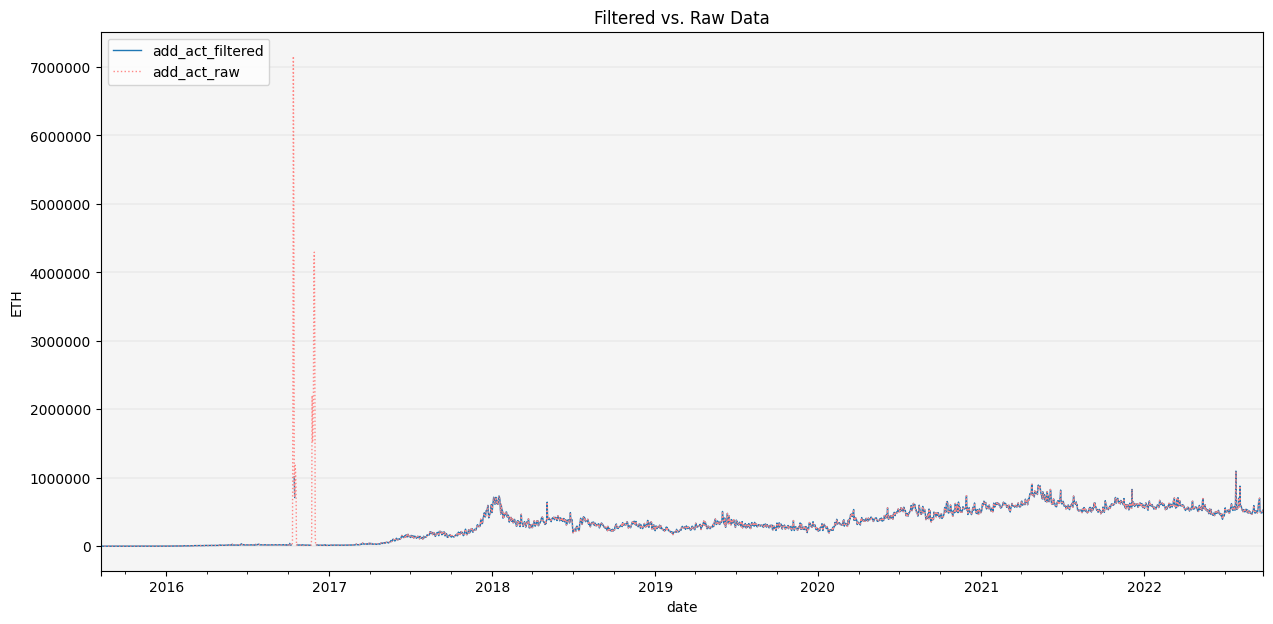
We can see that it goes a reasonably good job of identifying the large global outliers in active addresses for ETH in late 2017.
Filter
In addition to filtering outliers, the Filter class has several methods allow us to remove data that isn’t of interest to us in our analysis.
For example, let’s say we only want assets with a mimimum of $10 mil USD of average traded volumne, and those with a minimum of 100 price close observations. We can run the filter_avg_trading_val and filter_min_nobs methods on the raw data.
CleanData(df).filter_avg_trading_val(thresh_val=10000000, window_size=30).filter_min_nobs(min_obs=100).show_plot(plot_series=('ETH', 'close'))
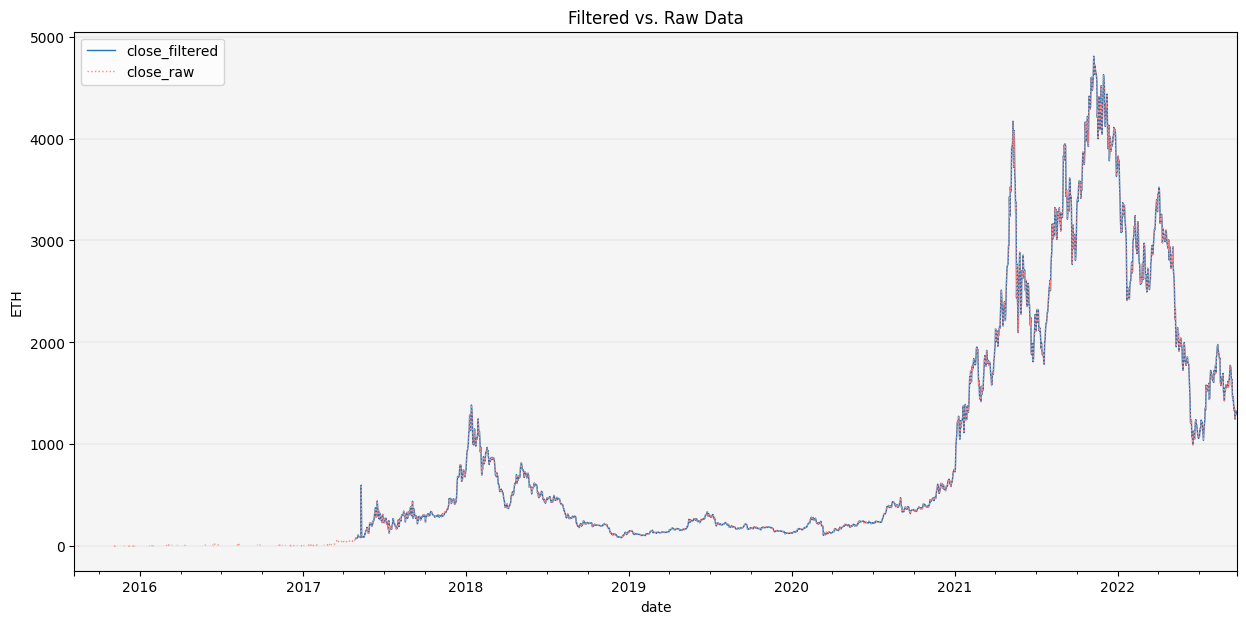
We see that our filter removed values up to early 2017 since ETH didn’t meet the minimum average trading value over a 30-day window.
Impute
The Impute class has several methods that allow us to replace missing values which can cause many issues in predictive/ML models, e.g. scikit-learn and other ML packages may not like missing values and fail to run properly.
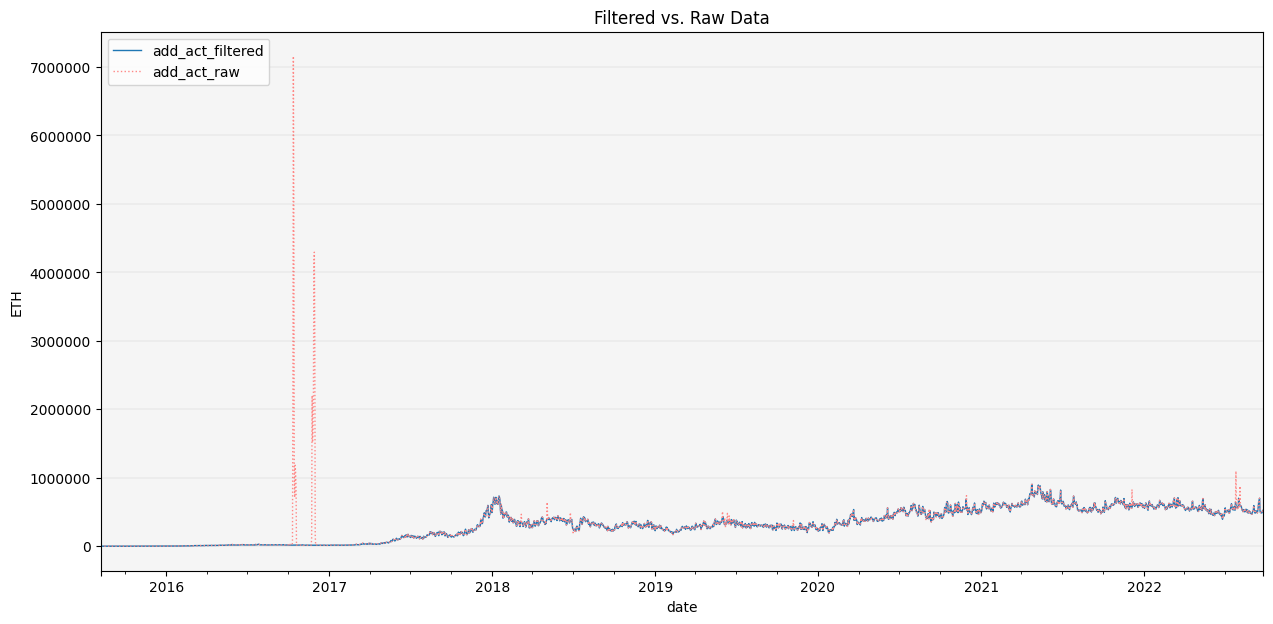
We can use it to impute/repair the missing vals/outliers from late 2017 for ETH active addresses with the repair_outliers method.
CleanData(df).filter_outliers(od_method='stl').\
              repair_outliers(imp_method='interpolate').\
              show_plot(plot_series=('ETH', 'add_act'))
Clean Data
CleanData allows us to chain together a series of data cleaning operations and returns either a plot of the filtered vs. raw data, the clean data in a dataframe, the filtered outlies (and forecasts if applicable) and/or a summary of all the data cleaning operations and final data.
CleanData(df).filter_outliers(od_method='stl').\
              repair_outliers(imp_method='interpolate').\
              filter_avg_trading_val(thresh_val=10000000).\
              get(attr='summary')
| close | volume | add_act | ||||
|---|---|---|---|---|---|---|
| BTC | ETH | BTC | ETH | BTC | ETH | |
| n_obs | 2220.00 | 2198.00 | 2220.00 | 2198.00 | 5004.00 | 2606.00 |
| %_NaN_start | 55.72 | 56.16 | 55.72 | 56.16 | 0.20 | 48.03 |
| %_outliers | 2.97 | 2.69 | 3.65 | 5.86 | 5.82 | 2.01 |
| %_imputed | 14.86 | 8.95 | 15.46 | 13.86 | 5.86 | 2.03 |
| %_below_avg_trading_val | 20.60 | 11.57 | 20.52 | 13.30 | 64.28 | 13.46 |
| %_NaN_end | 64.44 | 61.47 | 64.44 | 61.47 | 64.44 | 61.47 |
CleanData(df).filter_outliers(od_method='stl').\
              repair_outliers(imp_method='interpolate').\
              filter_avg_trading_val(thresh_val=10000000).\
              get(attr='df')
| close | volume | add_act | ||
|---|---|---|---|---|
| date | ticker | |||
| 2009-01-03 | BTC | <NA> | <NA> | <NA> |
| 2009-01-04 | BTC | <NA> | <NA> | <NA> |
| 2009-01-05 | BTC | <NA> | <NA> | <NA> |
| 2009-01-06 | BTC | <NA> | <NA> | <NA> |
| 2009-01-07 | BTC | <NA> | <NA> | <NA> |
| ... | ... | ... | ... | ... |
| 2022-09-23 | ETH | 1327.41 | 2004418.15 | 501558.0 |
| 2022-09-24 | BTC | 18923.79 | 330541.25 | 987921.0 |
| ETH | 1317.25 | 1068761.99 | 525728.0 | |
| 2022-09-25 | BTC | 18904.56 | 224299.67 | 987921.0 |
| ETH | 1292.72 | 877499.91 | 525728.0 |
7621 rows × 3 columns